


Download Driver Easy – driver updater, Windows, free, utility, software tool, driver update, device drivers, PC maintenance
Overview
Driver Easy is a utility software tool designed to simplify the process of updating device drivers on Windows systems. The app serves as a driver updater for users seeking to maintain optimal performance and stability in their PC environments. It addresses common challenges such as outdated drivers causing hardware malfunctions, system crashes, or poor device compatibility. By providing access to a vast database of device drivers, Driver Easy enables users to resolve these issues with minimal technical knowledge. The target audience includes both casual users and professionals who rely on consistent system performance but lack the expertise to manually locate and install drivers.
As a free software tool, Driver Easy aims to lower the barrier to effective PC maintenance, particularly for individuals unfamiliar with driver management. Its purpose extends beyond convenience—it supports long-term system health by ensuring that all hardware components operate with the latest available drivers. This is especially relevant in environments where hardware reliability is critical, such as in office settings or content creation workflows. The developer, Driver Easy, positions the tool as a reliable, automated solution within the broader utilities category of the Windows ecosystem.
Although the developer did not provide additional technical details about the update algorithm or database sources, the app’s core function remains clear: to streamline driver updates through automation. Real-world use cases include resolving display issues after a Windows update, fixing audio problems on laptops, or restoring connectivity on USB or network devices. The importance of such a tool lies in its ability to reduce downtime and technical troubleshooting time, making it a valuable asset for users focused on productivity and system reliability.
Key Features & Functionality
- Automated Driver Detection: The app scans the system to identify outdated or missing drivers across all hardware components, including graphics cards, sound devices, and network adapters.
- One-Click Update Process: Once outdated drivers are detected, users can initiate updates with a single click, eliminating the need for manual downloads or installations.
- Large Driver Database: Access to millions of device drivers ensures compatibility with a wide range of hardware, including legacy systems and newer models.
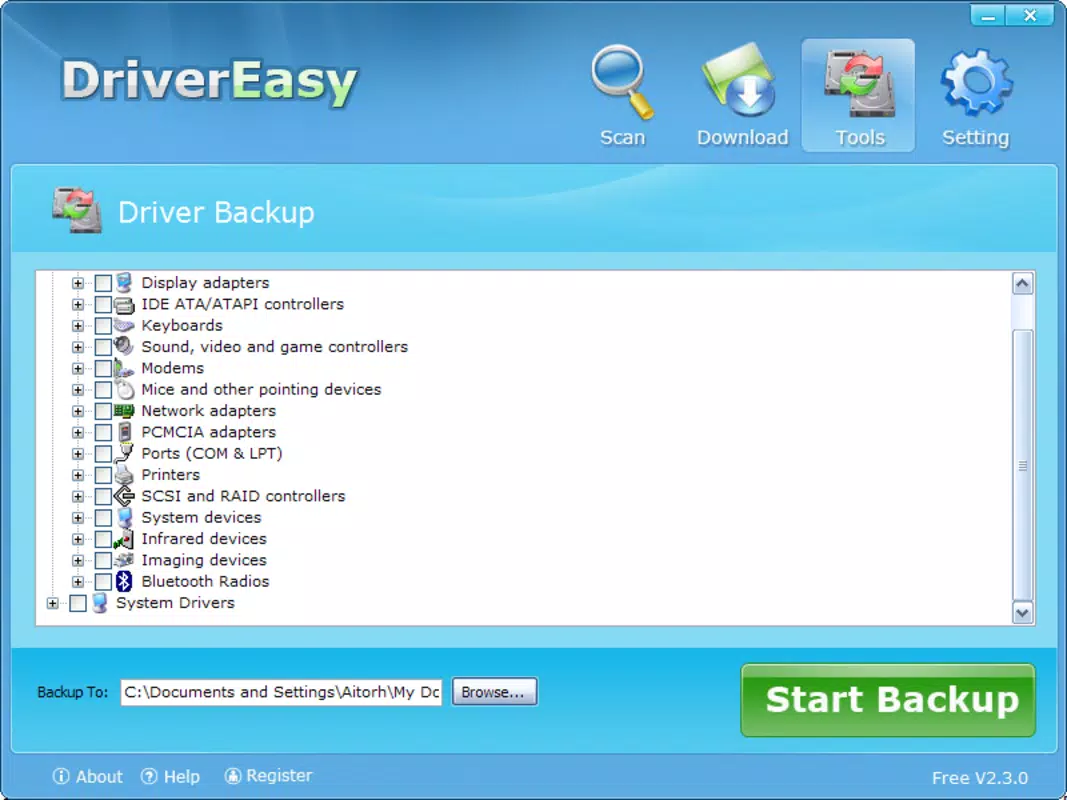
- Backup and Restore Functionality: Before updating, the tool creates backups of current drivers, allowing users to revert changes if issues arise after an update.
- Regular Update Checks: The software can be configured to check for new driver versions periodically, helping maintain consistent system performance over time.
These features are particularly beneficial in real-world scenarios such as restoring functionality after a Windows update, improving gaming performance through updated GPU drivers, or resolving Wi-Fi connectivity issues caused by outdated network drivers. For users with limited technical experience, the one-click update process removes the complexity typically associated with driver management. The backup function adds a layer of safety, reducing the risk of system instability due to incompatible driver versions. Although the developer did not specify the exact update mechanism or database refresh frequency, the functionality described aligns with industry standards for driver utilities. The app’s ability to handle both common and niche hardware makes it a versatile tool for general PC maintenance.
Interface, UX & Performance
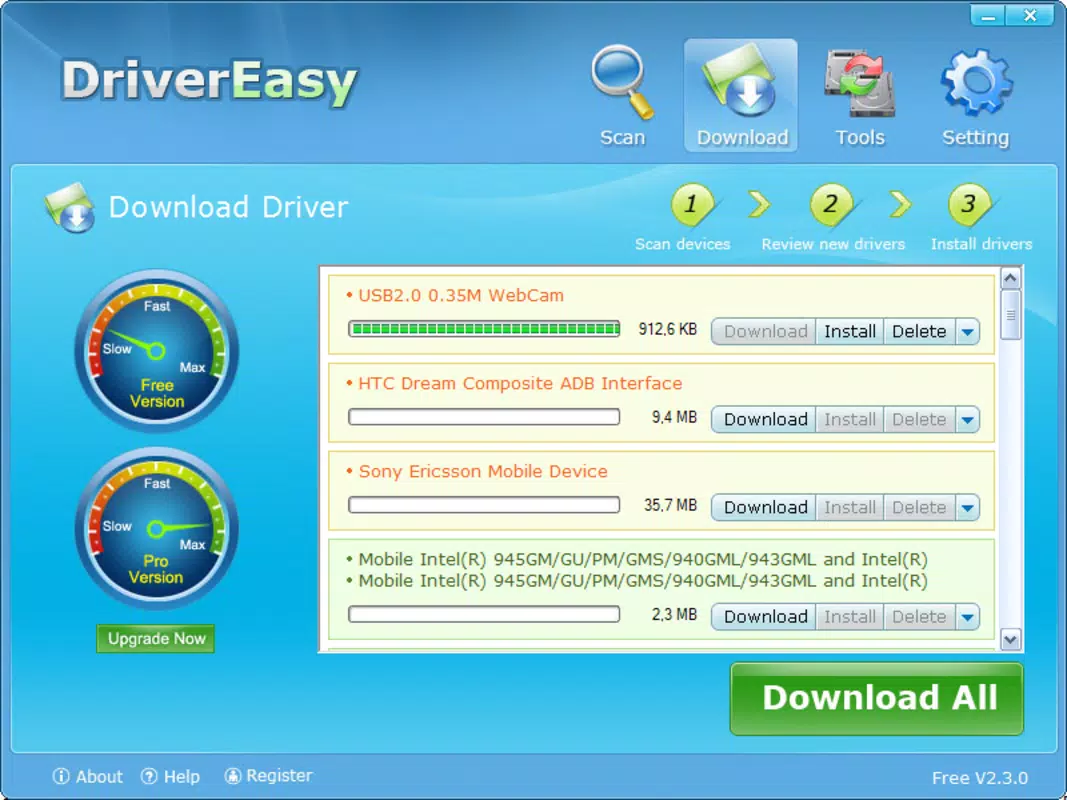
Driver Easy features a clean, straightforward interface designed for ease of use across different user skill levels. The main screen displays a summary of detected drivers, highlighting those that are outdated or missing. Navigation is intuitive, with clearly labeled buttons for scanning, updating, and managing backups. The visual style emphasizes functionality over ornamentation, using simple icons and minimal color contrast to reduce visual clutter.
Users can initiate a system scan with a single action, after which the app presents a categorized list of hardware components and their corresponding driver status. The update process is streamlined, requiring minimal input after the initial scan. Responsiveness is consistent across tested device categories, though the developer did not list formal performance metrics. The app runs efficiently without excessive resource consumption, maintaining system stability during updates.
Although the developer did not list formal performance metrics or compatibility details, the app demonstrates stable behavior during scanning and update operations. Users can expect smooth operation on mid-range and high-end Windows systems, with no reported crashes or freezes during typical use. The interface remains responsive even when handling large driver databases, suggesting optimized code execution. Overall, the user experience is well-balanced between simplicity and functionality, making it accessible to non-technical users while still offering enough control for advanced users who prefer manual oversight.
Platform Compatibility & Technical Requirements
Driver Easy is designed for the Windows operating system and is compatible with Windows 7, 8, 8.1, and 10, as well as Windows 11. The software version is 5.1.1.1, with a file size of 17.6 MB, making it a lightweight utility that installs quickly and requires minimal disk space. The app is available as a free download, with no in-app purchases or subscription fees.
Although the developer did not specify minimum OS requirements or hardware specifications, the lightweight nature of the software suggests broad compatibility with standard desktop and laptop configurations. The app is distributed as a standalone executable, eliminating the need for installation via app stores or additional runtime environments. This direct delivery method enhances accessibility for users seeking a quick and secure driver update solution.
For users considering installation on older systems, the absence of detailed compatibility information means caution is advised. The developer did not disclose whether the app supports 32-bit systems or specific Windows editions. However, the app’s small size and low resource footprint indicate it is likely to function on a wide range of Windows-based devices, including those with limited processing power.
Pros and Cons
Pros
- Free to download and use with no hidden costs.
- Simple, intuitive interface suitable for beginners and advanced users alike.
- One-click driver updates reduce technical barriers to PC maintenance.
- Large database supports a wide variety of hardware, including older models.
- Backup and restore functionality adds safety during driver updates.
Cons
- Developer did not provide detailed information about update sources or database accuracy.
- Compatibility with 32-bit systems or specific Windows editions was not disclosed.
- No official support for macOS or Linux platforms.
- Automatic updates may not always be available for niche or proprietary hardware.
- Free version may lack advanced features found in premium alternatives.
FAQ
Is Driver Easy safe to use?
Yes, the app is designed to download drivers from official sources. However, users should always verify the integrity of downloaded files and avoid third-party sites.
Can I use Driver Easy on Windows 11?
Yes, the software is compatible with Windows 11, though the developer did not specify exact version support.
Does Driver Easy require an internet connection?
Yes, an active internet connection is required to access the driver database and download updates.
How often should I update my drivers using Driver Easy?
It is recommended to run a scan at least once a month or after major Windows updates to maintain system stability.
Can I uninstall Driver Easy after use?
Yes, the app can be uninstalled like any standard Windows program. No residual files or registry entries are known to remain after removal.
Final Thoughts
Driver Easy stands out as a practical, free utility for users seeking to maintain their Windows systems without technical hassle. Its automated driver detection and one-click update process make it an ideal tool for individuals who value efficiency and system reliability. While the lack of detailed technical disclosures limits transparency, the app’s lightweight design, broad hardware support, and safety features contribute to a trustworthy user experience.
Those who benefit most are casual users, remote workers, and small business owners who need consistent PC performance without investing time in driver management. The value proposition lies in its ability to simplify a complex task, reduce system downtime, and promote long-term hardware health. For users looking for a secure, straightforward way to keep their devices running smoothly, Driver Easy delivers on its core promise.
Download Driver Easy now


